A writing-first iPhone app where a saved note, or a script accepted in Focalane, can become the teleprompter prompt before filming takes in the same app, so writing and filming no longer live in separate apps.
FocalaneCapture is for a creator whose best lines start as notes on a phone. The usual path is clumsy: write in one app, copy the words into a teleprompter in another, film in a third, and hope nothing drifted along the way. That switching costs momentum, and it is often where a good thought stalls before it ever reaches the camera.
The idea is that writing and filming are one motion. A note is written first, each block marked as the creator's own, pasted, or AI-assisted, and it can become the teleprompter prompt the moment it feels ready. In the fuller picture, a script accepted in Focalane arrives over the paired link, waits offline until Christian taps Use for filming, and the camera opens with the words ready. The phone films; Focalane keeps the plan.
Today, FocalaneCapture is the owner-operated app on Christian's iPhone, not an App Store or TestFlight release. Notes, prompts, the camera with its level guide, and immutable takes all work, and on 25 September 2026 it paired with Focalane's hosted relay. No accepted script has come through that link yet, and takes stay on the phone. Getting them to Focalane is the road ahead.
How it works
Write
Prompt
Film
Keep the take
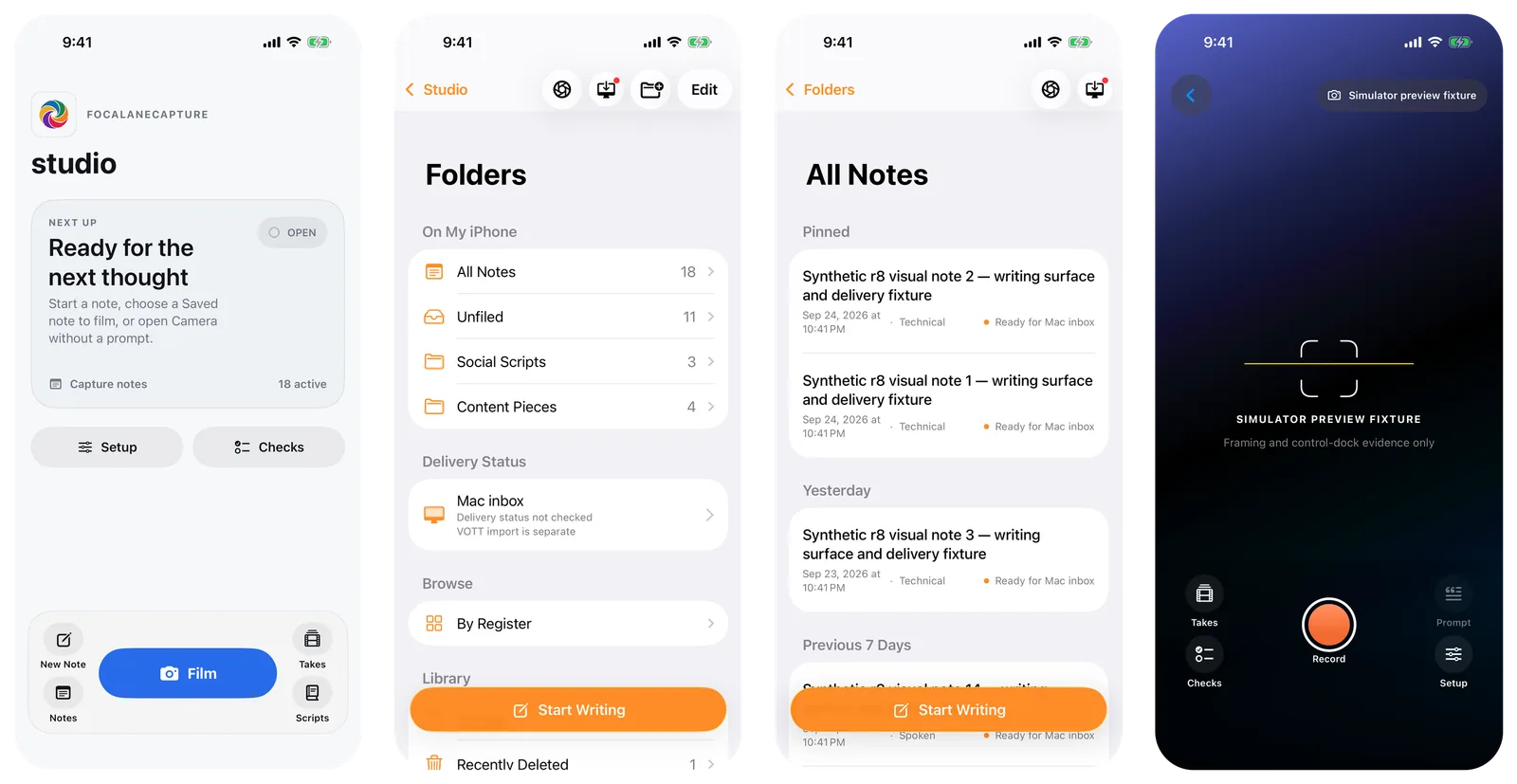
A native SwiftUI app with a local note store that records where each block of writing came from. A saved note or an accepted Focalane script becomes the teleprompter prompt, and the camera keeps immutable takes on the phone. A Scripts link pairs with Focalane's hosted relay and keeps received scripts available offline; a hosted script becomes the prompt only after an explicit Use for filming tap. Notes can be delivered to VoiceOfTheTexts' Mac relay over the local network, and FocalaneSpatialLab may propose filming setups that FocalaneCapture accepts or ignores.
Studio, folders, notes, and camera. A simulator build with the app's own synthetic notes and camera fixture; no real note or take is shown. Captured 24 September 2026.
Where it stands today
On 16 September 2026 FocalaneCapture replaced the earlier Capture app in place, with existing data byte-identical, and it is accepted as the owner-operated production app. It is not an App Store or TestFlight release. On 25 September it paired with Focalane's hosted relay on Christian's iPhone, using a key held in the phone's Secure Enclave and an on-screen code check; the link is live, but no accepted script has come through it yet.
Working now
Notes with per-block provenance and folders
Saved notes or accepted scripts as teleprompter prompts
Camera with a level guide and immutable takes
Rear and front camera analysis checks
Note delivery to a Mac relay
Hosted pairing with Focalane through a Secure Enclave device key
Not there yet
The hosted link is paired and live, but no accepted script has been delivered through it yet.
Takes stay on the phone; sending them to Focalane and the first production edit are not built yet.
Takes are not linked to the prompt they were filmed from; that would need a new versioned record and privacy decisions.
How it got here
VOTT's native iPhone writing app started
FocalaneCapture founded from a byte-identical import of that writing app, joined with the camera from an earlier standalone iPhone camera app; accepted Focalane scripts became teleprompter prompts
Replaced the writing app in place, keeping every note; the separate camera app was retired
Rear and front camera analysis checks accepted
Paired with Focalane's hosted relay on Christian's iPhone
What comes next
Next step
Receive the first accepted Focalane script through the hosted link and film from it after an explicit Use for filming tap.
After that
Receive the first accepted script through the hosted link, keeping manual file import
A shared filming-readiness check before FocalaneRecorder and FocalaneCapture takes combine
Proof and fine print
Dated evidence
Started from a byte-identical import of the Capture appimport
Replaced the earlier capture app in place with existing data byte-identicalsuccession
Camera, takes, and teleprompter accepted on a real iPhoneattended
Signed single-note delivery to the Mac relay acceptedattended
Front camera analysis acceptedattended
Hosted pairing adopted on a real iPhoneattended
Boundaries it keeps
Not an App Store or TestFlight release
Camera and microphone access is requested only when filming starts
Relay delivery is not backup, and VOTT import stays separate
The hosted link carries accepted scripts only: no media, remote camera control, or publishing
FocalaneSpatialLab only proposes; FocalaneCapture decides
Christian's role
Designed the writing-first flow, provenance rules, camera and take boundaries, and the in-place succession; directed and reviewed the implementation and ran the attended acceptance on a real iPhone.